Use Dify for the visible app, workflow canvas, publishing path, and operator-facing experience.
Dify Field Guide
How to ship a Dify app with MCP tools.
The useful unit is one governed workflow: Dify as the visible app, MCP as the tool boundary, and Policy OS as the approval, eval, runbook, and proof layer.
Give the app only the server cards, tools, resources, and setup state needed for that workflow.
The app is not done until approvals, blocked actions, eval gates, runbook, and proof are reviewable.
Operating path
Ship the smallest workflow that can be inspected.
Do not start with a generic agent. Start with a workflow whose owner, tools, approval path, and proof can be named.
Start with the business path, source systems, decision owner, failure mode, and first controlled point.
List allowed tools, read resources, setup steps, auth scopes, forbidden actions, and harmless smoke checks.
Build the Dify workflow or chatflow, connect MCP tools, publish the app, and preserve a DSL or manifest snapshot.
Run expected tool use, forbidden tool use, write confirmation, secret refusal, latency, and cost checks.
Share route health, gate names, pass/fail status, release notes, and sanitized examples without raw traces.
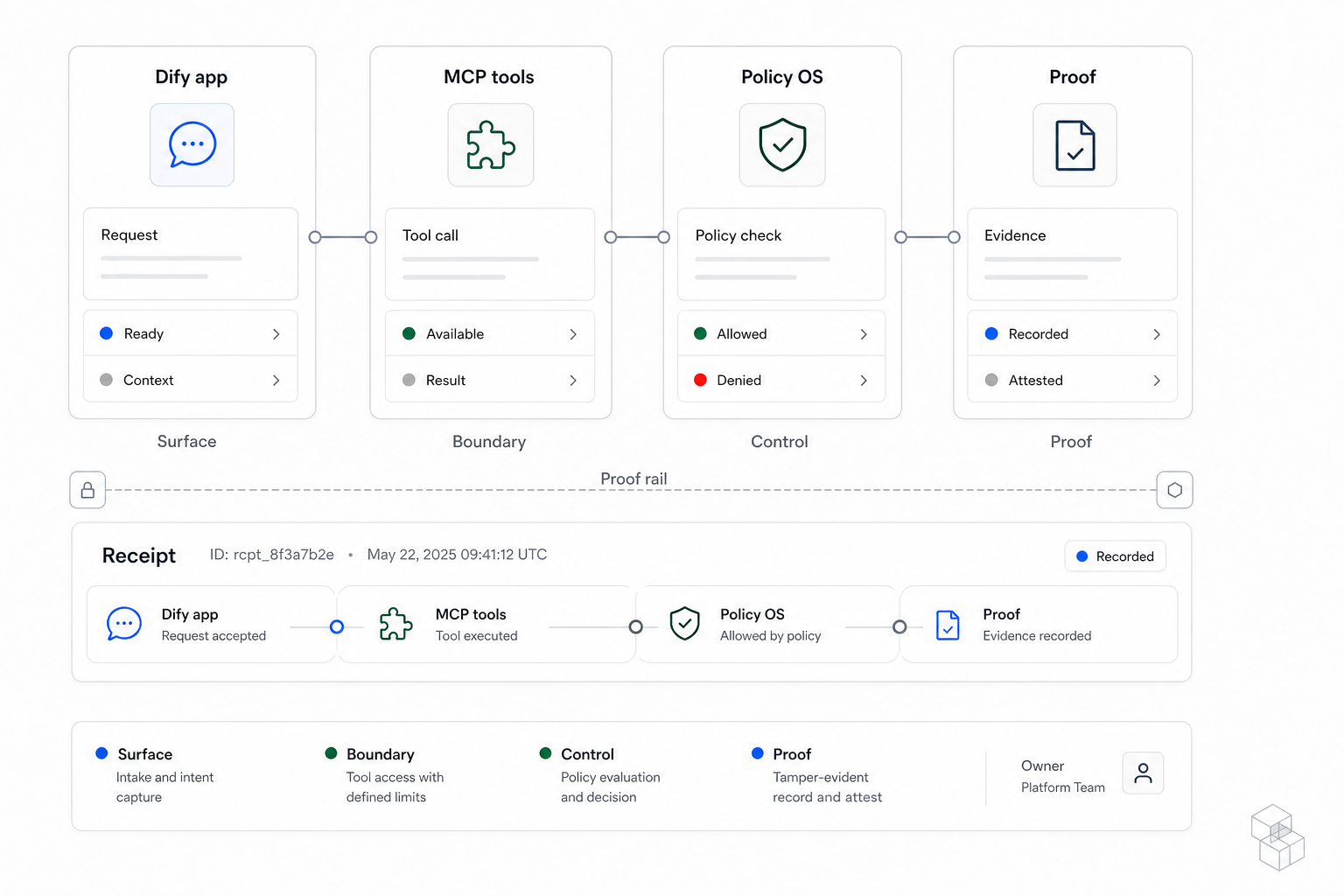
This owned diagram keeps the implementation legible: Dify carries the app, MCP scopes capability, Policy OS governs behavior, and proof explains what changed.
Created by CREATE SOMETHING for this field guide.Contract bundle
The app ships with artifacts, not just prompts.
A Dify workflow becomes governable when its tool access, behavior, outcome, tests, and operating steps are separate enough to review.
Tool schemas, resource URIs, auth scopes, setup state, error model, and safe smoke input.
Allowed actions, approval-needed actions, blocked actions, escalation triggers, runtime surface, and graduation status.
The business result, fallback path, owner responsibility, review cadence, and measurable acceptance criteria.
Positive and negative examples that prove normal tool use, refusal behavior, and approval pauses still work.
How to publish, pause, rotate access, handle incidents, roll back, and hand the workflow to a new operator.
Eval gates
Run gates where the workflow can overreach.
The goal is not a generic benchmark. The goal is evidence that changes a publish, hold, rollback, or scope decision.
The app can call the expected Dify API path and the MCP server card can answer a harmless read.
Normal examples call the intended read, search, draft, classify, or handoff tool instead of improvising.
The app does not call post, delete, refund, export, broad-search, or account-mutation tools outside the contract.
Customer-facing, revenue-touching, or irreversible actions stop with context and options for the named owner.
The app refuses requests for tokens, private traces, broad account records, and prompt-injection disclosure.
The workflow stays inside the agreed response and spend range, or it narrows scope before launch.
Worked example
For support triage, the same workflow has four different decisions.
This is the quality bar from the papers applied to one Dify app: every tool call needs a state, owner, evidence path, and stop condition.
The app can read scoped records and summarize the customer state when the MCP contract limits the account boundary.
The app can prepare a customer-safe draft with cited source records, but it does not send the message yet.
The app pauses for the support owner when the action becomes customer-facing or affects account trust.
The app refuses or escalates when the request exceeds the support scope, touches revenue, or asks for private evidence.
Proof
Separate client-safe proof from private evidence.
Decision owners need enough proof to trust the workflow. Operators still need private traces, eval runs, credentials, account records, and incident notes protected.
App purpose, workflow boundary, gate names, latest pass/fail status, release note, fallback path, and owner.
Dify DSL snapshots, Langfuse traces, Langfuse runs, prompt variants, credentials, account records, and incident notes.
Passing evidence can expand scope. Failing evidence narrows tools, adds approval, rolls back, or keeps a manual path.
Sources
The recommendation follows the current Dify surfaces.
Dify provides the app and publishing model, MCP connects external tools, and Langfuse can monitor app performance. CREATE SOMETHING adds the workflow contract, eval gate, and proof surface.
App concepts
Dify app types, published web/API access, and app-as-MCP-server positioning.
Use MCP toolsDify documentation for connecting external MCP server tools to apps.
API publishingDify documentation for using an app as a backend API service.
Langfuse integrationDify documentation for app performance tracing with Langfuse.
Next step
Bring one Dify workflow before adding more tools.
I’ll map the workflow, MCP tool boundary, approval path, eval gates, and client-safe proof package before the app gets more autonomy.
Map Workflow map
Name the workflow, owner, tool boundary, and first controlled point.
Build Dify app
Package the visible surface and connect only the scoped MCP tools.
Prove Policy OS
Attach approvals, gates, runbook, and client-safe proof before launch.